Routing number: What it is and how to find yours


Key takeaways
- A routing number is a nine-digit code that identifies your bank for electronic transactions like direct deposits, wire transfers and ACH payments.
- You can find your routing number on the bottom left of paper checks, in your mobile banking app or by calling your bank.
- Large banks often have multiple routing numbers for different states or transaction types, while smaller banks typically use one number.
A routing number is a nine-digit bank identification code that serves as your financial institution’s electronic address. Think of it as a postal code that ensures your money reaches the correct bank when you make electronic payments, receive direct deposits or transfer funds between accounts.
Every bank and credit union has at least one routing number, with larger institutions often maintaining separate numbers for different states or transaction types.
What routing numbers are used for
Routing numbers help enable various banking transactions that require identifying your specific financial institution. When you set up direct deposit for your paycheck, your employer needs both your account number and routing number to ensure funds reach your account at the correct bank.
Developed by the American Bankers Association in 1910, routing numbers were originally created for processing paper checks but now facilitate numerous digital banking transactions.
These nine-digit codes facilitate ACH transfers between accounts, wire transfers for large transactions, online bill payments, and peer-to-peer payments through apps like Venmo or Zelle. Without routing numbers, electronic payments couldn’t distinguish between different financial institutions, potentially sending your mortgage payment to the wrong bank entirely.
Understanding your routing number is essential for managing your finances effectively. Whether you’re switching to a checking account or setting up automatic savings transfers, having your routing number readily available streamlines the account setup process and prevents delays in accessing your money.
How to find your bank routing number
Because bank routing numbers are used for so many transactions, you should know how to find yours. Here are several ways to locate your bank’s routing number.
How to find a routing number on a check
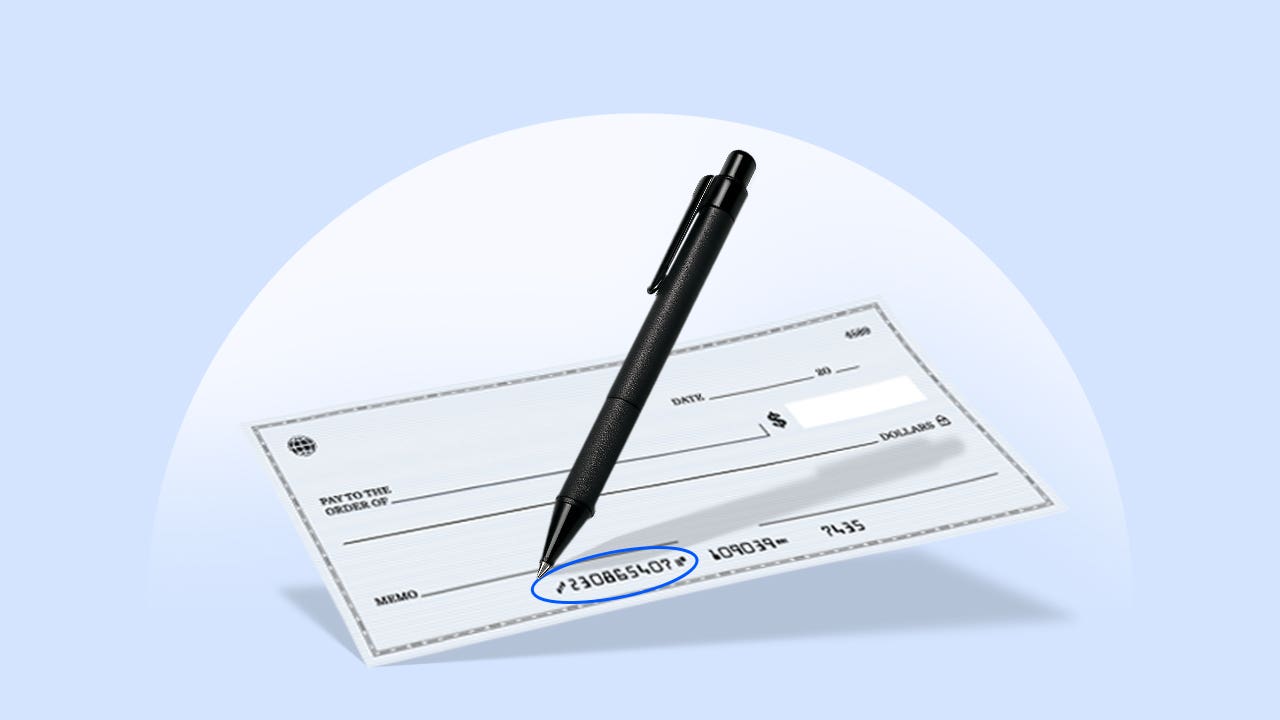
If you have a paper check, finding your routing number takes seconds. It appears in the bottom left corner of your check. It’s the first set of nine numbers and typically begins with a 0, 1, 2 or 3.
On any check, you’ll see three sets of numbers at the bottom: the routing number (first nine digits on the left), your account number (middle section), and the check number (right side). These numbers are separated by special symbols that help bank processing equipment read them accurately.
How to find a routing number without a check
If you don’t have a checkbook or paper check, there are several other ways to find your routing number:
- Online: Log into your bank account online and go to “account information” or “account summary.” The routing number is typically listed in account details, though the exact location varies by bank.
- Mobile banking app: Most mobile banking apps display routing numbers in account information sections. Look under settings, account details or direct deposit information.
- Bank statement: Some banks include the routing number on your monthly paper or electronic bank statement, though not all do.
- Call customer service: You can ask a customer service representative to give you the routing number or confirm one you found online.
- Visit a branch: Bank tellers can provide your routing number in person. Some banks also display routing numbers in the lobby for customers’ convenience.
- Bank’s website: Many banks list their routing numbers on their public websites, often in the FAQ section or on pages about direct deposit or wire transfers.
Routing number vs. account number: What’s the difference?
While both numbers are essential for banking transactions, they serve distinct purposes in the financial system. Your routing number identifies your bank to the broader financial network, remaining the same for all customers at your branch or region. Your account number identifies your specific account and remains unique to you.
| Routing number | Account number |
|---|---|
| Identifies your bank | Identifies your specific account |
| Same for everyone at a specific bank (in the same region) | Unique to your personal account |
| Public information | Private information |
| Used to route external payments | Used to identify your specific funds |
| Always 9 digits | Can vary in length (typically 8-12 digits) |
You can think of your bank account like your street address, and the routing number like the city and state. You need both sets of information for money to get properly routed into (and out of) your account. Using both unique identifiers helps reduce fraud as your account number is specific to you and your bank’s routing number is specific to them.
Learn more: Understanding checking account basics
Most larger banks have multiple routing numbers that differ by state or region. Here are the routing numbers for some of the largest banks in the U.S. that have footprints in all 50 states, plus the District of Columbia.
Bank of America routing numbers
| State | Routing Number |
|---|---|
| Alabama | 051000017 |
| Alaska | 051000017 |
| Arizona | 122101706 |
| Arkansas | 082000073 |
| California | 121000358 |
| Colorado | 123103716 |
| Connecticut | 011900254 |
| Delaware | 031202084 |
| District of Columbia | 054001204 |
| Florida | 063100277 |
| Georgia | 061000052 |
| Hawaii | 051000017 |
| Idaho | 123103716 |
| Illinois (northern) | 071000505 |
| Illinois (southern) | 081904808 |
| Indiana | 071214579 |
| Iowa | 073000176 |
| Kansas | 101100045 |
| Kentucky | 064000020 |
| Louisiana | 051000017 |
| Maine | 011200365 |
| Maryland | 052001633 |
| Massachusetts | 011000138 |
| Michigan | 072000805 |
| Minnesota | 071214579 |
| Mississippi | 051000017 |
| Missouri | 081000032 |
| Montana | 051000017 |
| Nebraska | 123103716 |
| Nevada | 122400724 |
| New Hampshire | 011400495 |
| New Jersey | 021200339 |
| New Mexico | 107000327 |
| New York | 021000322 |
| North Carolina | 053000196 |
| North Dakota | 051000017 |
| Ohio | 071214579 |
| Oklahoma | 103000017 |
| Oregon | 323070380 |
| Pennsylvania | 031202084 |
| Rhode Island | 011500010 |
| South Carolina | 053904483 |
| South Dakota | 051000017 |
| Tennessee | 064000020 |
| Texas | 111000025 |
| Utah | 123103716 |
| Vermont | 051000017 |
| Virginia | 051000017 |
| Washington | 125000024 |
| West Virginia | 051000017 |
| Wisconsin | 123103716 |
| Wyoming | 051000017 |
Source: Bank of America
Chase Bank routing numbers
| State | Routing Number |
|---|---|
| Alabama | 065400137 |
| Arizona | 122100024 |
| Arkansas | 065400137 |
| California | 322271627 |
| Colorado | 102001017 |
| Connecticut | 021100361 |
| Delaware | 083000137 |
| District of Columbia | 044000037 |
| Florida | 267084131 |
| Georgia | 061092387 |
| Idaho | 123271978 |
| Illinois | 071000013 |
| Indiana | 074000010 |
| Iowa | 075000019 |
| Kansas | 103000648 |
| Kentucky | 083000137 |
| Louisiana | 065400137 |
| Maine | 083000137 |
| Maryland | 044000037 |
| Massachusetts | 021000021 |
| Michigan | 072000326 |
| Minnesota | 075000019 |
| Mississippi | 065400137 |
| Missouri | 103000648 |
| Montana | 102001017 |
| Nebraska | 103000648 |
| Nevada | 322271627 |
| New Hampshire | 083000137 |
| New Jersey | 021202337 |
| New Mexico | 102001017 |
| New York (upstate) | 022300173 |
| New York (downstate) | 021000021 |
| North Carolina | 072000326 |
| North Dakota | 103000648 |
| Ohio | 044000037 |
| Oklahoma | 103000648 |
| Oregon | 325070760 |
| Pennsylvania | 083000137 |
| Rhode Island | 083000137 |
| South Carolina | 072000326 |
| South Dakota | 103000648 |
| Tennessee | 065400137 |
| Texas | 111000614 |
| Utah | 124001545 |
| Vermont | 083000137 |
| Virginia | 044000037 |
| Washington | 325070760 |
| West Virginia | 051900366 |
| Wisconsin | 075000019 |
| Wyoming | 102001017 |
Source: Chase Bank
Note: For states not listed, check with a local branch, call Chase to confirm your routing number, or refer to a check or the Chase mobile app.
Wells Fargo Bank routing numbers
| State | Routing Number |
|---|---|
| Alabama | 062000080 |
| Alaska | 125200057 |
| Arizona | 122105278 |
| Arkansas | 111900659 |
| California | 121042882 |
| Colorado | 102000076 |
| Connecticut | 021101108 |
| Delaware | 031100869 |
| District of Columbia | 054001220 |
| Florida | 063107513 |
| Georgia | 061000227 |
| Hawaii | 121042882 |
| Idaho | 124103799 |
| Illinois | 071101307 |
| Indiana | 074900275 |
| Iowa | 073000228 |
| Kansas | 101089292 |
| Kentucky | 121042882 |
| Louisiana | 121042882 |
| Maine | 121042882 |
| Maryland | 055003201 |
| Massachusetts | 121042882 |
| Michigan | 091101455 |
| Minnesota | 091000019 |
| Mississippi | 062203751 |
| Missouri | 113105449 |
| Montana | 092905278 |
| Nebraska | 104000058 |
| Nevada | 321270742 |
| New Hampshire | 121042882 |
| New Jersey | 021200025 |
| New Mexico | 107002192 |
| New York | 026012881 |
| North Carolina | 053000219 |
| North Dakota | 091300010 |
| Ohio | 041215537 |
| Oklahoma | 121042882 |
| Oregon | 123006800 |
| Pennsylvania | 031000503 |
| Rhode Island | 121042882 |
| South Carolina | 053207766 |
| South Dakota | 091400046 |
| Tennessee | 064003768 |
| Texas | 111900659 |
| Texas (El Paso) | 112000066 |
| Utah | 124002971 |
| Vermont | 121042882 |
| Virginia | 051400549 |
| Washington | 125008547 |
| West Virginia | 121042882 |
| Wisconsin | 075911988 |
| Wyoming | 102301092 |
Source: Wells Fargo
For states not listed or to verify your specific routing number, check with your bank directly. Banks occasionally update their routing numbers, so it’s always a good idea to confirm current information.
When routing numbers change
Although routing numbers mostly remain the same, certain circumstances can trigger changes. Bank mergers, acquisitions or internal system restructuring may result in new routing numbers for existing customers.
If your bank is acquired by another institution or merges with a competitor, you’ll typically receive advance notice about any routing number changes. Similarly, moving to a different state might require updating your routing number if your account transfers to a regional branch.
How to verify a routing number
When sending money, especially large amounts, it’s very important to make sure you have the correct routing number. Here are some reliable ways to verify a routing number:
- Contact the bank directly: The most reliable method is to call the bank’s customer service or visit a branch. You can also look online via the bank’s official website.
- Use the ABA routing number lookup: The American Bankers Association maintains an official Routing Number Verification tool to verify routing numbers.
- Check the Federal Reserve’s website: The Federal Reserve E-Payments Routing Directory provides information on routing numbers.
Remember that routing numbers are public information, so verification doesn’t require sharing any personal account details.
FAQs about routing numbers
Bottom line
A routing number is an important piece of information for many banking transactions. While it may seem like just another number to remember, knowing your routing number and where to find it can save you time and hassle when setting up direct deposits, paying bills online or transferring money between accounts.
Unlike your account number, routing numbers are public information that identifies your bank, not your individual account. For most everyday banking needs, you’ll use your routing number along with your account number to ensure money moves to and from your account correctly.
Why we ask for feedback Your feedback helps us improve our content and services. It takes less than a minute to complete.
Your responses are anonymous and will only be used for improving our website.